> For the complete documentation index, see [llms.txt](https://docs.onyxia.sh/llms.txt). Markdown versions of documentation pages are available by appending `.md` to page URLs; this page is available as [Markdown](https://docs.onyxia.sh/admin-doc/catalog-of-services/custom-catalogs/onyxia-extension.md).
# x-onyxia
Onyxia's JSON Schema extention
Onyxia defines a custom extension to the [JSON Schema spec](/admin-doc/catalog-of-services/custom-catalogs/json-schema-support.md). It adds Onyxia-specific properties under a reserved key: `x-onyxia`.
The main use case is per-user defaults based on identity. For example, you can inject the right Git and S3 credentials for each user.
### overwriteDefaultWith
Let's consider a sample of the `values.schema.json` of the InseeFrLab/helm-charts-interactive-services' Jupyter chart:
And it translates into this:
{% embed url="" %}
Note the `"git.name"`, `"git.email"` and `"git.token"`, this enables [onyxia-web](https://github.com/InseeFrLab/onyxia-web) to pre fill the fields.
If the user took the time to fill its profile information, [onyxia-web](https://github.com/InseeFrLab/onyxia-web) knows what is the Git **username**, **email** and **personal access token** of the user.

[Here](https://github.com/InseeFrLab/onyxia/blob/main/web/src/core/ports/OnyxiaApi/XOnyxia.ts) is defined the structure of the context that you can use in the `overwriteDefaultWith` field:
```typescript
// Documentation: https://docs.onyxia.sh/contributing/catalog-of-services
import type { Language } from "./Language";
import { id } from "tsafe/id";
import { z } from "zod";
import { assert, type Equals } from "tsafe/assert";
import { type Stringifyable, zStringifyable } from "core/tools/Stringifyable";
export const onyxiaReservedPropertyNameInFieldDescription = "x-onyxia";
export type XOnyxiaParams = {
/**
* This is where you can reference values from the onyxia context so that they
* are dynamically injected by the Onyxia launcher.
*
* Examples:
* "overwriteDefaultWith": "user.email" ( You can also write "{{user.email}}" it's equivalent )
* "overwriteDefaultWith": "{{project.id}}-{{k8s.randomSubdomain}}.{{k8s.domain}}"
* "overwriteDefaultWith": [ "a hardcoded value", "some other hardcoded value", "{{region.oauth2.clientId}}" ]
* "overwriteDefaultWith": { "foo": "bar", "bar": "{{region.oauth2.clientId}}" }
*/
overwriteDefaultWith?: string | Stringifyable[] | Record;
overwriteListEnumWith?: string | Stringifyable[];
hidden?: boolean;
readonly?: boolean;
};
export type XOnyxiaContext = {
user: {
idep: string;
name: string;
email: string;
password: string;
ip: string;
darkMode: boolean;
lang: "en" | "fr" | "zh-CN" | "no" | "fi" | "nl" | "it" | "es" | "de";
/**
* Decoded JWT OIDC ID token of the user launching the service.
*
* Sample value:
* {
* "sub": "9000ffa3-5fb8-45b5-88e4-e2e869ba3cfa",
* "name": "Joseph Garrone",
* "aud": "onyxia",
* "groups": [
* "USER_ONYXIA",
* "codegouv",
* "sspcloud-admin",
* ],
* "onyxia-username": "garronej",
* "email": "joseph.garrone@insee.fr",
* "policy": "stsonly",
* "typ": "ID",
* "azp": "onyxia",
* "email_verified": true,
* "onyxia-roles": ["vip"]
* }
*/
decodedIdToken: Record;
accessToken: string;
refreshToken: string;
// See: https://docs.onyxia.sh/v/v10/admin-doc/catalog-of-services/customize-your-charts/declarative-user-profile
profile: Record | undefined;
};
service: {
oneTimePassword: string;
};
project: {
id: string;
password: string;
basic: string;
};
git: {
name: string;
email: string;
credentials_cache_duration: number;
token: string | undefined;
};
vault:
| {
VAULT_ADDR: string;
VAULT_TOKEN: string | undefined;
VAULT_MOUNT: string;
VAULT_TOP_DIR: string;
}
| undefined;
s3:
| {
profileName: string;
AWS_ACCESS_KEY_ID: string | undefined;
AWS_SECRET_ACCESS_KEY: string | undefined;
AWS_SESSION_TOKEN: string | undefined;
AWS_DEFAULT_REGION: string;
AWS_S3_ENDPOINT: string;
port: number;
pathStyleAccess: boolean;
/**
* If true the bucket's (directory) should be accessible without any credentials.
* In this case s3.AWS_ACCESS_KEY_ID, s3.AWS_SECRET_ACCESS_KEY and s3.AWS_SESSION_TOKEN
* are undefined.
*/
isAnonymous: boolean;
}
| undefined;
s3_array: {
profileName: string;
AWS_ACCESS_KEY_ID: string | undefined;
AWS_SECRET_ACCESS_KEY: string | undefined;
AWS_SESSION_TOKEN: string | undefined;
AWS_DEFAULT_REGION: string;
AWS_S3_ENDPOINT: string;
port: number;
pathStyleAccess: boolean;
/**
* If true the bucket's (directory) should be accessible without any credentials.
* In this case s3.AWS_ACCESS_KEY_ID, s3.AWS_SECRET_ACCESS_KEY and s3.AWS_SESSION_TOKEN
* are undefined.
*/
isAnonymous: boolean;
}[];
region: {
defaultIpProtection: boolean | undefined;
defaultNetworkPolicy: boolean | undefined;
allowedURIPattern: string;
customValues: Record | undefined;
kafka:
| {
url: string;
topicName: string;
}
| undefined;
tolerations: unknown[] | undefined;
from: unknown[] | undefined;
nodeSelector: Record | undefined;
startupProbe: Record | undefined;
sliders: Record<
string,
{
sliderMin: number;
sliderMax: number;
sliderStep: number;
sliderUnit: string;
}
>;
resources:
| {
cpuRequest?: `${number}${string}`;
cpuLimit?: `${number}${string}`;
memoryRequest?: `${number}${string}`;
memoryLimit?: `${number}${string}`;
disk?: `${number}${string}`;
gpu?: `${number}`;
}
| undefined;
openshiftSCC:
| {
scc: string;
enabled: boolean;
}
| undefined;
};
k8s: {
domain: string;
ingressClassName: string | undefined;
ingress: boolean | undefined;
route: boolean | undefined;
istio:
| {
enabled: boolean;
gateways: string[];
}
| undefined;
randomSubdomain: string;
initScriptUrl: string;
useCertManager: boolean;
certManagerClusterIssuer: string | undefined;
};
ai: {
enabled: boolean;
models: string[]; // /[]
defaultModel: string | undefined; // /
providers: {
name: string; //Needs to be unique
apiBase: string;
apiKey: string | undefined;
models: string[];
type: "openai-compatible" | "openai" | "anthropic" | "mistral" | "deepseek";
}[];
};
proxyInjection:
| {
enabled: boolean | undefined;
httpProxyUrl: string | undefined;
httpsProxyUrl: string | undefined;
noProxy: string | undefined;
}
| undefined;
packageRepositoryInjection:
| {
cranProxyUrl: string | undefined;
condaProxyUrl: string | undefined;
packageManagerUrl: string | undefined;
pypiProxyUrl: string | undefined;
}
| undefined;
certificateAuthorityInjection:
| {
cacerts: string | undefined;
pathToCaBundle: string | undefined;
}
| undefined;
};
```
You can also concatenate string values using by wrapping the XOnyxia targeted values in `{{}}`.
{% code title="values.shema.json" %}
```json
"hostname": {
"type": "string",
"form": true,
"title": "Hostname",
"x-onyxia": {
"overwriteDefaultWith": "{{project.id}}-{{k8s.randomSubdomain}}.{{k8s.domain}}"
}
}
```
{% endcode %}
### overwriteListEnumWith
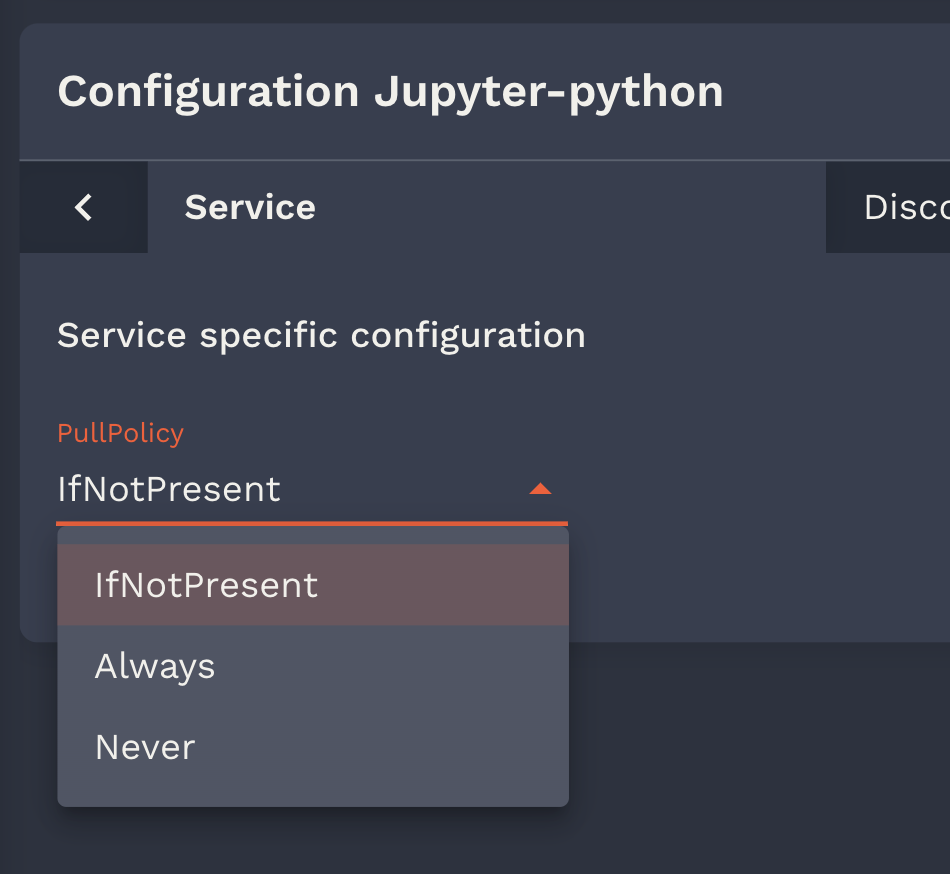
This is an option for customizing the options of the forms fields rendered as select.
Example of select form field in the onyxia launcher
In your values shema such a field would be defined like:
{% code title="values.shema.json" %}
```json
"pullPolicy": {
"type": "string",
"default": "IfNotPresent",
"listEnum": [
"IfNotPresent",
"Always",
"Never"
]
}
```
{% endcode %}
But what if you want to dynamically generate the option? For this you can use the overwriteListEnumWith x-onyxia option.\
For example if you need to let the user select one of the groups he belongs to you can write:
### overwriteSchemaWith
See: [values.schema.json overrides](/admin-doc/catalog-of-services/override-schema-for-a-specific-instance.md)
---
# Agent Instructions
This documentation is published with GitBook. GitBook is the documentation platform designed so that both humans and AI agents can read, navigate, and reason over technical content effectively. Learn more at gitbook.com.
## Querying This Documentation
If you need additional information that is not directly available in this page, you can query the documentation by asking a question.
Perform an HTTP GET request on the following URL with the `ask` and `goal` query parameters:
```
GET https://docs.onyxia.sh/admin-doc/catalog-of-services/custom-catalogs/onyxia-extension.md?ask=&goal=
```
`ask` is the immediate question: it should be specific, self-contained, and written in natural language.
`goal` is what the user is ultimately trying to achieve, the reason they need the answer. Sharing it helps GitBook give you a better, more relevant answer. A goal is most helpful when it describes the outcome the user wants rather than restating the question. For example, with `ask=how do I create an API token`, a goal like `automate deployments from our CI pipeline` lets GitBook tailor the answer to that use case.
The response will contain a direct answer to the question and relevant excerpts and sources from the documentation.
Use this mechanism when the answer is not explicitly present in the current page, you need clarification or additional context, or you want to retrieve related documentation sections.